Showing posts with label business. Show all posts

Tuesday, October 11, 2011

2011 Tax Planning for Businesses

Submitted by Marietta Z. Courtney, CPA, MST

Q.  What is Tax Planning?
A.  An analysis with the goal of helping you keep more of your hard earned money.  It’s a tool to be used to help you make sound business decisions and minimize your taxes.
Q.  Is it something only big companies do?
A.  No. Everyone can benefit. You work hard for your money: going to trade shows, networking events, increasing your visibility, blogging, etc.  You need this information to help you decide on your action steps.  If you do nothing with it, its what the federal and state governments will tax you on and then there  will be less money available for the business.
Q.  Is it expensive?
A.  It does not have to be.  It can be as basic or detailed as you need. You can start by doing the analysis yourself. Then talk to your CPA about your results so you can decide on appropriate action steps together.
Q.  Do I wait until the end of the year?
A.  If you wait, it may be too late. The goal is to determine what you can do in 2011.
Example for a cash basis business:  For Discussion Purposes Only
1. Determine your Net Income (Profit) or Net Loss - The total income for the year of your business (example- cash received) LESS total expenses (example- cash paid out and you may also have some non- cash expenses such as depreciation). 
2 A. Are you left with a Profit ?– are there any items you’ve been meaning to buy for your business, any expenses coming due soon that you can pay before the end of the year, any groups your business was looking to join, did you want to sign up for training or conferences. Talk to your CPA to find out what additional deductions would be allowable.
2B. Are you showing a Loss? Have you had Losses in previous years and could your business be in danger of being treated as a hobby by the IRS? Talk to your CPA to find out if this is a concern for your business, what it would mean and if there is any additional income you can recognize this year.
REQUIRED DISCLOSURES: To ensure compliance with requirements imposed by the IRS, I inform you that any tax advice contained in this communication (including attachments) is not intended or written to be used, and cannot be used, for the purpose of avoiding penalties under the Internal Revenue Code.
Marietta Z. Courtney, CPA, MST
Serving Business and Individual Clients for Over 18 Years
(617) 416-2096
www.courtneycpa.com

Monday, July 18, 2011

Be The Best You Can Be

 Be The Best You You Can Be


"We can only be more today than we were yesterday" – Mary Morrissey


Keeping Up With The Jones’
What an exhausting pursuit whether you enter the race in your personal or professional life. Wouldn’t you agree?
While on vacation, I realized how much I’d been comparing myself and my business to others. There’s not one bit of empowerment in saying you’re not doing as well as another person.

A Simple Lesson – It’s All Up To Me
Years ago, when I was in retail, we had a year of unrealistic budgets. The calculations made the numbers impossible to achieve.
In order to build momentum in my store, I focused on week to week and month to month growth, rather than the numbers on a page. That shift allowed me to stay motivated, motivate my team and when the new budgets were published, we were poised for success.
I admit, until recently I’d forgotten that lesson. Since vacation I’ve begun to look at myself as my only competition. I compare me to me. “How did I do yesterday?” “How did that compare to the day before?” Not “How am I doing compared to them?”

Be Your Own Biggest Competition
Whether it’s personal or business goals you’re looking to achieve, this shift will rev up your energy rather than tear it down. You’ll also find success much more easily than when you compare yourself to others because there’s always someone new to compare to, but there’s only one you.

Do you agree or disagree? I’d love to hear your opinion.

Jen Vondenbrink
Life Simplified
http://www.yourlifesimplified.com/

Tuesday, June 28, 2011

Tax Tips from Marietta - Child Care Expenses

Qualify for the Child/Dependent Care Credit and claim summer day camp and childcare expenses.

Need to reduce the amount of tax that you owe? Well … you may be able to claim a credit if you pay someone to care for a dependent under the age of 13, or for your spouse or dependent who is not able to care for himself or herself. The credit can be up to 35 percent of your expenses. To qualify, you must pay these expenses so that you can work or look for work. Here are some things you need to know:  

·         The cost of day camp may count as an expense towards the Child and Dependent Care Credit. Keep in mind that expenses for overnight camps do not qualify.

·         You must have paid the child and dependent care expenses so that you (and your spouse, if filing jointly) could work or look for work. If you do not find a job and have no earned income for the year, you cannot take this credit.

·         You must make payments for child and dependent care to someone you (and your spouse) cannot claim as a dependent. If you make payments to your child, he or she cannot be your dependent and must be aged 19 or older by the end of the year.

·         If you pay someone to come to your home and care for your dependent or spouse, you may be a household employer who has to pay employment taxes. Usually, you are not a household employer if the person who cares for your dependent or spouse does so at his or her home or place of business.
·         If you pay expenses to a sitter at your home or a daycare facility outside the home to provide child care, you may get some tax benefit if you qualify for the credit. You will need the name of the child care provider, the address, the identification number, i.e. Social Security number or Employer Identification Number and the total amount paid.

·         If your employer provides dependent care benefits under a qualified plan, you may be able to exclude these benefits from your income. Your employer will be able to tell you whether your benefit plan qualifies. There are limits to the amount that can be excluded from your income.  

Be sure to take advantage of this credit if you are eligible. _________________________________________________
Here’s a list of helpful IRS forms and publications:
·      Form 2441, Child and Dependent Care Expenses
  • Form W-10, Dependent Care Provider’s Identification and Certification
Contact me with any questions or for more information.
Marietta Z. Courtney, CPA, MST

Monday, June 20, 2011

Tips To Maximize Summer for Entrepreneurs

submitted by Jen Vondenbrink - Life Simplified

The sun is out and the days are warm. I don’t know about you, but I’ll admit it’s hard to stay focused when summer calls. All you may want to do is jump in the pool or head to the beach. Memories of a snowy winter are still fresh and staying inside all day doesn’t seem right.

 
Photo credit: myrtlebeachblog via Flickr under creative commons license

Being an entrepreneur isn’t a jail sentence.  You started your own company to have flexibility to enjoy these moments.  Now that your business is up and running, however, you find it difficult to extract yourself from your office.

Fear not.
 Here are some productivity tips that can help you maximize your summer.

Get up a little earlier. 
There’s something revitalizing about listening to the birds first thing in the morning.  Get up about 30-60 minutes earlier.  Do some stretching.  If it’s nice, get a walk in.  Or if you’re like me head to the office

Schedule a personal day
Want to go to the beach?  Plan a “personal day.”  You remember those from your previous life, right?  They’re special days you took off during the work week as mini vacations.  Give yourself so many personal days a year, then plan them into the calendar.  There’s nothing better than looking forward to an impromptu vacation.

Give yourself the night off (or even better, the weekend off!).
 Lots of companies have shorter Friday’s during the summer.  Some even went to 4 day work weeks in the summer.  If your business can afford it, plan some of these.

What’s the benefit of taking these few small steps?
Sanity, creativity and productivity.  You’ll find you’re more invigorated when you are working because you have these treats to look forward to.
 
Jen Vondenbrink
Life Simplified
www.yourlifesimplified.com
Life Enrichment and Leadership Training
781-864-1782

Friday, June 10, 2011

Emotional Effects of Colors


Submitted by Marie Hoyt-Pauriry - Pixel Artists Design
 
We have been getting more requests for logo design. And this article about the emotional effects of color can help you choose what color(s) you want for your logo. Or at the very least, explain the meaning of the colors you have already chosen…

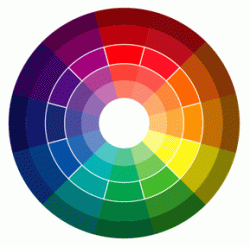
Colors have different psychological effects, positive as well as negative. This point must be kept in mind while choosing colors in your design since various colors convey varied meanings
Color Wheel

Red

Red is the color of energy, it’s bold, it’s powerful, it’s vibrant. It has the longest wavelength (the distance over which the wave’s shape repeats). It’s the color of effectiveness, excitement and liveliness. All over the world we follow red traffic light to stop, its visibility is the strongest amongst all other colors because of its highest wavelength. On the other hand its negative impacts can be aggression, visual disturbance and strain. You live in a red room for a day and you will go crazy, it has to be complimented with other colors to make it subtle.

Yellow

Yellow is a very emotional color, it is the color of self esteem, confidence and optimism. After red yellow has the longest wave length, appearing to be strong from a distance. World over yellow cabs can easily be seen, sunflowers, daffodils appear to be friendly. Contrary to this it also communicates few negative values like depression, hatred and anxiety.

Blue

Blue is the color of intelligence, vastness, royalty, serenity, coolness and tranquility. Sky appears blue and gives calm effect, water appears blue and gives peace of mind. Blue appears to be the favorite color of most of the people but on the other hand it is also a color of coldness, unfriendliness and unemotional.

Green

Green is the most refreshing and cool color. Green is the color of life, fertility, reassurance, peace, harmony, balance. Nature is green and how soothing it is to our eyes. Not a single tree in this world is of the same green tint or shade, yet it appears to be so full of life and create environmental beauty.  As for its negative traits it is the color of Boredom, stagnation, blandness and enervation.

Violet

Violet is color of truth, luxury and spiritual awareness. It has the shortest wavelength therefore it is considered to be weak also. A color of introversion and suppression. It is associated with deep contemplation and royalty, meditation and quality.

Orange

Orange gives warmth, comfort, security, passion, fun and frolic. Due to the mixture of red and yellow it gives stimulation and sensuality. Use of too much orange gives a feeling of no serious attitude and gives a feeling of deprivation if used with black.

Pink

Pink is a cute color, very feminine, love and tranquility. Though pink is a tint of red but it soothes rather than stimulates. It gives comfort and suggests grace and elegance. Sometimes too much pink looks physically weak and appears full of flaws. It creates impact of inhibition.

Grey

Grey is a neutral color, not giving a direct psychological effect. It may represent emptiness and dullness. It gives impression of dampness and right tone of gray must be used otherwise it may make your composition depressive.

Black

All colors are absorbed in black. Black is glamorous, graceful, efficient and security. Women wear black to attract, they look sophisticated. Black creates hindrance since there’s no light no reflection. It works perfectly with white thus the co relation is either alternation or repetition. Black is the color of mourning also. Too much black creates heaviness and scary look.

White

White is pure, clean, hygienic, innocent and simple. White is total reflection. It gives perception of space, too much clutter in a design can be overcome by using spaces of white. The negative effect of white is that it makes other colors used with it cold and unfriendly. Can create a diminishing effect.

Brown

Brown is the color of earth, rugged, serious, old, and ancient. Rustic look can very well be created with this color. Since brown is the combination of red and yellow with much larger percentage of black, it also gives the same seriousness as black but in a warmer way. It is natural and supportive but at the same time it is too non humorous and appears heavy.

http://pelfusion.com/design/color-wheel-classifications-emotional-effects-and-color-theory/

marie hoyt-pariury
designer ~ sales ~ social media
mpariury@pixelartists.com
p 781-355-2160
www.pixelartists.com/marie

Thursday, June 2, 2011

Whya Writer?


submitted by Fran Fahey - Fran's Fine Editing
I had been thinking about starting a post on why business people hafta hire me as a writer. Afta all (sorry about the diction—I’m from Boston), we have all gone too (or is it to?) school and know howta write, right?
Then, before I could even begin scratching my head (yes, studies have shown that head scratching really does help the ideas to flow better), I found some great excuses to put off the task at hand and play with my neglected Twitter account instead. Neglected because I still can’t quite get the advantage of using Twitter (or as I call it, Twitta), and I thought maybe I’d find out if I at least tried to use it.
Lo, I found that some people in my absence had decided to “follow” me! Poor neglected beings. My last Twitta post (OK, OK, it’s a Tweet) was September 23, 2010.
 So I jumped on again and decided to find some people of my own to follow. And then the magic of social media happened. Two hours later, I finally came up for air. I had found tweets by Liz Craig, a fellow writer and friend, and that led me to her fine blog which then led me to her beautifully written post on why people should hire a professional writer! My work’s done, baby!!!
Here’s the link to Liz’s excellent explanation of what a professional writer can do for you (which I could never top if I took a million years to scratch one out—thanks, Liz). And here’s to Twitta, which I guess does play a useful role in getting all of us to hook up with one anotha.
Fran Fahey
413-529-1189

Monday, May 23, 2011

A Blogger’s Best Friend

Post submitted by Jen Vondenbrink - Life Simplified

Your alarm clock goes off.  You sit up, rub your eyes and stumble to the kitchen for your morning coffee.  You pour a cup and read up on the headlines of the day.

There's nothing unusual about this routine.  Did you ever stop to think how those articles magically appeared?

Time To Get Organized
Long before your coffee was brewed, editors gathered and mapped out content (online, offline, and even the morning news).  It's been going on for centuries. 
Today, however, you as the author of a blog, online articles, etc. need to learn what keeps these editors organized.
Newspapers, radio, television, magazines use an editorial calendar.  It helps them focus their content, make it relevant to their audience and meet their deadlines.
If you are publishing your own content, an editorial calendar is key to your success.

What Does An Editorial Calendar Do For You?
Basically...it saves you time.  We all can use that right?

When you have a central place to put your ideas, track your progress and know what needs to get done in a day, you know where to start.  If you don't, you can waste hours procrastinating or even worse, writing content no one reads.

Think about the last couple blogs or articles you wrote. 
How long did it take you from start to finish to come up with the idea and write the article? How much time did you spend between steps (or staring at a blank screen)?  How consistently do you publish your articles?  Do you know what your next article is about?
If you're not happy with your answers to the questions above, an editorial calendar will help.

Keep It Simple
The best way for an editorial calendar to save you time is to keep it simple.  The simplest editorial calendar can have your ideas and publication dates.
Some additions to the calendar could be:
  • Working titles
  • Notes or bullet points to cover in the article
  • Draft due date
  • Publication location (blog, newsletter, online e-zine)
  • Author (if several are contributing to a blog or if your having guest bloggers)
I've even adding some tracking to my editorial calendar.  I note the dates I publish the article to different sites and track responses.  This feedback has helped me refine my content and distribution strategies.
 
Resources I've Found Helpful
Here are some resources and articles I've found helpful as I put my calendar together
That's A Lot Of Work
Initially it may seem a lot of work to set up your calendar.  That's why I advocate starting simple and adding features as you grow.
 
Anything that's worth it takes some work.  That coffee you've been sipping while reading this article...can take weeks to months to process, not to mention the 5 years it takes a coffee bush to mature before it can be harvested.
 
See, nothing comes without a little sweat equity.
 
If you're using an editorial calendar, I would love to hear about what has worked for you and what hasn't. 
 
 Feel free to comment below or share on Facebook.
_________________________________________________
Whatcha doing this summer?  Does Social Media Summer Camp sound interesting?  (Notice I didn't say school because we'll be having much more fun).  Email me if you want to hear more.
 
 
Jen
Jen Vondenbrink
Life Simplified
Life Enrichment and Leadership Training
781-864-1782
 
Connect with us on Facebook and LinkedIn

Monday, May 9, 2011

How’s Everything Going? Perfect?

 submitted by Jen Vondenbrink - Your Life Simplified

You’ve kicked the corporate bucket.  You’ve had enough of working for others and decide to strike out on your own.  You do all the research, build the business plan and dream of opening day when customers are jumping up and down about your business.

Opening day arrives.  People stream in.  You have a ribbon cutting.  Everyone is happy.  It’s perfect!
Reality Sets In
Week Two: You open the doors.  People stream in.  Not as many as Week One, but they are still customers. 

Week Three: You open the doors.  People trickle in.  “Hummm,” you wonder.

Week Four: You open the doors…and wait…and wait.  Things aren’t so perfect any more.
End of week Four: Your thoughts “I’m a failure!”

No one is born knowing how to talk or walk, so why do you think as an adult when you embark on something new, you should be perfect right off the bat?

No One Is Perfect
According to dictionary.com, one definition of perfect is: excellent or complete beyond practical or theoretical improvement.

Really!?!

This means you start a business, have a child or learn something new and on day one you should be excellent or complete beyond practical or theoretical improvement.  Now I ask you, based on this definition, is this realistic?

Reality or Fantasy?
Was your business planning a fantasy?  No.  A plan is a reality.  You need a plan, direction and goals.
The fantasy is your idea that everything will run perfectly to that plan.  We delude ourselves into thinking it’s as easy as it looks on television.  I love the Oprah Channel series that shows behind the scene of the Oprah Show.  What you see is a seamless 60 minutes of information/entertainment.  What happens behind the curtain is a different story. 

A New Definition
Another definition of perfect on dictionary.com is thorough or complete.  What if you took that definition and applied it to pieces of the process rather than the whole experience? 
Let’s take your social media efforts.  Were they thorough and complete?  Did you implement your entire social media marketing plan thoroughly and completely?  Or was it a dashed off message here and there? 

Where your implementation was thorough and complete, celebrate. You did a fabulous job!
Where your implementation wasn’t thorough and complete, evaluate your process and set plans in place for the future.  Learn from your experience and move forward.  It’s those small improvements that move you closer to an entire “perfect” process.

How Facebook Implements
Whether you are a fan of Facebook or not, you have to admire how they have developed the functionality of the network.
According to the Welcome Page from “Thefacebook” in 2004, Facebook was simply a directory of students at various colleges.  It allowed students to:
·         Search for people at your school
·         Find out who is in your classes
·         Look up your friends’ friends
·         See a visualization of your network
That’s it.  Nothing fancy.  Nothing about business.  Just kids connecting. 

Over the past 7 years Facebook has become the place for the world to hang out.  Mark Zuckerberg didn’t wait until everything was perfect.  He and his team work hard to upgrade the experience.  Each implementation however comes back to reviewing, celebrating the “perfect – thorough or complete” and, analyzing what needs to be improved next.  Then they move forward.

What Happens Next Is Your Decision
In Week Five of your business you can continue to think “I’m a failure.”  Guess how much business you’ll do then?  Or you can redefine what perfect means for you and your business, celebrate what you can and begin to build plans for the next step.


JenJen Vondenbrink
Life Simplified
http://www.yourlifesimplified.com/
Life Enrichment and Leadership Training
781-864-1782

Thursday, April 21, 2011

Web Copy Redux

Posted by Frances Fahey of Fran's Fine Editing.

picture of a URL


Got some helpful feedback on my web post, WWW.What the Heck? (link) , which attempts to talk about what makes good copy for your website.


One person asked: How about some examples of good and bad web copy, Fran? 
OK—can do!

It just so happens that a few months ago, I made a presentation to another group on the same topic. Here are the two websites I used as my examples, with the URLs and other identifiers of the guilty held back (in case they are your first cousins). I’ll just share the first two paragraphs from their respective home pages. Take a look at them and compare each to my points about being brief, using informal language, and getting to the heart of what your client cares about.


Both websites are for companies doing home inspections. This one I don’t like—it uses we/you point of view, but it’s mostly about the company, not the client. On the site itself, you can’t even find this text until you’ve “paged down” twice past too many uninformative stock photos:

[name of company] provides comprehensive narrative home inspection reports on single family residences, multi-unit apartment buildings and commercial buildings. Our home inspection report findings are in compliance with [name of state’s organization]  [acronym] Real Estate Inspectors Association) Standards of Practice.

Your understanding of the home inspection findings is critical to our goal of providing the best customer service available. We encourage you to accompany the home inspector through the home inspection process to receive a complete consultation and valuable orientation to the home, property and its systems.


This one I like a lot better. You see this text the minute you open their home page. Same word count, has all the necessary keywords, makes similar points—but who would you rather hire?

[name of company] offers a one-stop shopping solution for your [name of city] home inspection needs. With us you can get a whole house inspection, termite, radon and any number of other services all from the same company!

It is a stressful time when you buy or sell a home. Knowing that you have had a fair, honest competent whole house inspection by an experienced independent third party inspector helps reduce the risk and makes the entire experience a happier one.
And here's something fun you can do with your own website, recommended to me recently by a client of mine. Evaluate the SEO of your site for free using websitegrader.com from HubSpot. The part I thought was really cool is Readability Level. This may vary based upon the clients you want to attract, but aim for the simplest level you can. My website? "Primary/secondary school" level.

Finally, if you are in the mood for reading more stuff, here's an article by Grace Smith that talks more about web design and the importance of good content. See #4 about content and #5 about clutter:

http://www.openforum.com/idea-hub/topics/technology/article/top-5-web-design-mistakes-small-businesses-make-grace-smith


Best of luck with your own website!


Fran Fahey,
Fran's Fine Editing

Monday, April 11, 2011

Do you own your website? (Part 4 - website hosting)

Submission by Robin Clapp - Web Design by Robin

This is part 4 of the series "Do you own your website?".  Today you will learn what website hosting is and how to purchase it.

I will ask a new client to perform two tasks when they hire me to design their website.
1) Pick and purchase a domain name for their website, which I covered in another blog article.
2) Purchase a hosting plan, which is the main focus of this blog article.  I will start by explaining what a website host is.

How does an internet browser know where a website lives?

Website Rendering

It begins with registering your domain name with the whois database.  All domains are registered here.  This is how they know which ones are available and which ones are not.  The whois database record that contains the domain name also contains the address of where the website lives.  This address is normally that of a computer server that has access to the world wide web 99.9% of the time.  You want as little downtime as possible, right?

When you pay for your hosting plan you are paying for your website to be hosted on a server - giving it an address.  Once you know your server and website address it can be recorded in your domain name record and VOILA the connection is made and your website can be found.

Not all hosting plans are the same.

I specialize in content management websites, specifically in an application called Joomla.  The hosting plan needs to support the tool set I use. Not all hosting plans are the same. Godaddy hosting plans are a great fit for Joomla websites and are reasonably priced.  This is why I recommend their economy hosting plan to my clients.

Website Ownership
By completing steps 1 and 2, listed above, you have claimed ownership of both your domain name and hosting plan.  Now my favorite part begins, CREATING A REALLY COOL WEBSITE FOR YOU!

Robin Clapp
Web Design by Robin
Bringing Your Website to Life
Robin@Web-Design-By-Robin.com
508-622-1464

Wednesday, April 6, 2011

Singin' the Email Blues

Submitted by Frances Fahey of Fran's Fine Editing.


       Please allow me a few moments to rant about proper email usage. I have written in the past about it, but apparently nobody read my emails.
       I have burrowed into my (admittedly disorganized, non-foldered) email list in the past to try to find a particular one, only to see that it didn't have a subject line, which is why I couldn't find it, or it doesn't have the person's current phone number on it, so I have to go elsewhere to find him, and then I find that another email didn't answer all of my questions, so I have to email her again.
         Not that I haven't been guilty of hitting the "send" button too soon, before double-checking that the attachment was there. At least it doesn't happen as often now as it did when I first started sending them as attachments 25 years ago (oops, did I just tell you my age? Please disregard).
       Val Nelson is a good writer, a good coach, and a good mentor from one of my women's groups.  Take her "E-tiquette Quiz" on email usage and tell me how you do. While you are there, read some of her other helpful tips on blogging and email marketing, too.

Frances Fahey
Fran's Fine Editing
 (413) 529-1189    
"I'll keep you composed"

Thursday, March 31, 2011

Do you own your website? (Part 3 - content management websites)

This is part 3 of the series "Do you own your website?".  Today you will learn how Content Management Websites can give you control of your website.


Submitted by Robin Clapp - Web Design by Robin

 In part 1 of this series you learned why it is important to own your website's domain name and how to check if you do.  In part 2, I explained to those just starting out how to pick and purchase a domain name.  Domain name ownership is an important piece of website ownership.  However having your name listed as the registered owner is only half the story.


Can you make changes to your website?  And when I ask this question I'm assuming you are not a web coding guru but instead an everyday business owner rocking and rolling in what you do best, your business.  If this is the case, then updating your website is a task that can be simplified by using a content management system.

Content Management Websites

I use the term "content management" all the time when I am referring to website design.  Content management is just that - a system that manages content.  When you use one with your website you are accomplishing content management electronically and online!  How cool is that?

Why is it so important to have a Content Management Website?

Better said do you have time and money to waste?  A content management website allows you to make changes to the content of your website.  If you don't have the ability to do it yourself you will have to pay your web designer to do it and it will get done when they fit you into their schedule (TIME and MONEY).
I'm not saying that you shouldn't give someone else the task of updating your website content - I'm stressing that you should have the choice.  What's the point of owning this really great marketing tool if you can't use it to promote your business at will?

In closing...

"Will I be able to update my website?"  This is a question I hear everyday as a website designer and I feel it is one of the most important ones!  If you are not asking this question - YOU SHOULD BE.

Robin Clapp
Web Design by Robin
Robin@Web-Design-By-Robin.com
508-622-1464

Thursday, March 17, 2011

Do you own your website? (Part 2 - pick and purchase a domain name)

This is part 2 of the series "Do you own your website?"  
submitted by Robin Clapp - Web Design by Robin


Today you will learn how to pick the right domain name for your website and a few tips to follow when you purchase it.

Picking a domain nameTake some time to pick the perfect domain name for your business website.  A good domain name should be relatively short, easy to say and easy to type.  The rules of the past are changing - today you need something remembered rather than something that meets google's standards.  In other words - brand yourself and focus your search engine optimization efforts elsewhere.

Back in 2005 when I purchased my domain name, www.web-design-by-robin.com, we were told google couldn't read words without the hyphens.  Six years later you can imagine my frustration relaying it over and over to people in conversation with all those hyphens.   And trying to type it into your smart phone - forget about it!

Since then I have purchased www.websitesbyrobin.com and permanently pointed it to my original domain name using a 301 redirect.  This will be my mobile domain name and the one I give out over the phone making my life and those interested in viewing my website so much easier.

So where should you start? 
Think of the words and phrases used in your industry and try to work them into your domain name.  As you can see I used web design in my first and websites in my second leaving no doubt as to what I do.  Then add a bit of personality.  Yes, webdesign.com would seem like a great domain name but its too vague to be remembered.

Checking domain name availabilityAs you are going through the exercise of thinking of a domain name for your business website you should probably know how to check if your choices are available for purchase. 
Here is a tool Godaddy provides to check domain name availability. www.godaddy.com/domains

Before we get too far along let me make a suggestion about extensions.  If the domain name is for your business use .com.  This goes back to easily remembered.  Everyone assumes .com therefore use it.

Purchasing a domain name
There are two important factors to keep in mind when purchasing a domain name.
The first is make sure it is registered in your name and this information is public.  When the option comes up to make your ownership private choose NO.  In my blog article titled "Do you own your website? (Part 1 - domain name ownership)" I show you how to check domain name ownership using the whois database lookup.  This process is commonly used to check a business' credibility.  Making your ownership private makes it look like you have something to hide.

The second is how long to purchase your domain name for.  Domain names are relatively cheap, under $20/year.  If your domain name ownership term is 5 years you will rank higher than someone only setup for a year.  Google likes an established website.  Little things like this make a difference.

So there you have it, a few tips for picking and purchasing a domain name for your business website.  I'd love to hear what you decide on!

Robin Clapp
Web Design by Robin

The Penguins Go to the Bronx Zoo

 Another Fine Post from Fran Fahey of  Fran’s Fine Editing


     So the joke goes something like this, with a few embellishments:

     Mr. Brown was traveling through Kansas and met a guy selling penguins at $2.00 each. “What a great deal,” he thinks. He calls the Bronx Zoo, who tells him that they’ll buy as many penguins as he can sell them at $90.00 each, so he buys 129 of them to bring to New York.

     Around Hackensack, NJ, Mr. Brown’s car breaks down. While he’s waiting for AAA, a Good Samaritan stops to help him, and Mr. Brown says, “Would you take these penguins to the Bronx Zoo?” The guy agrees to help, loads all 129 penguins into his car, and takes off.

     In the Bronx, Mr. Brown gets into a major bumper-to-bumper traffic jam. As he creeps closer to the zoo, he sees people lined up along the sides of the street, pointing and laughing. As he pulls up to the zoo, he sees the guy who helped him walking along the sidewalk, trailed by a line of penguins holding balloons. “What the heck?” he says to the guy. “I asked you to take them to the zoo!”

     “Sure, I did,” the guy said. “But I had a little money left over, so I’m taking them to the movies!”

Moral of the story?
 Be careful how you word things. You just may get exactly what you ask for.

Fran Fahey

Monday, March 14, 2011

Blogging is Writing!

Submission by Jen Vondenbrink - Life Simplified

 I was inspired to tag onto Fran’s Blog about Writer’s Block Unblocked.

     If you haven’t read the post, and you are thinking of doing any writing or blogging, I would encourage you to grab a cup of tea and read it.  She offers great grounded advice about writing.

    Why plug Fran’s post when I usually write about social media?

     Staring at a blank page, be it paper or computer, is just plain daunting.  You feel out of ideas and rather silly staring at the page before you.  Soon you find anything else to do besides writing…even laundry.

     For bloggers, it’s important to sit down on a regular basis and write.  Take it seriously.  You are a writer.  Stephen King didn’t casually write his books.  He sat down every day to write.  You as a blogger need to be just as disciplined.

    Why?

     Because keeping your content fresh is the first step in gaining an audience.  Have you ever stumbled upon a blog and the last post was six months ago?  How much confidence do you have in the information the blogger shared?  In our own minds we can justify the vacation, but our readers don’t care.  They want consistent information they can count on.

     It’s a huge boost to your business when you do blog consistently.  As Robin Clapp can attest, the more your information gets shared around, the better your website/blog will come up in a search on Google.  This means your ideal customer, sitting right now at the computer looking for you can find you, easily.

     As Fran says “the more you write the easier it gets.”  So look at your calendar.  Set up a schedule.  And start writing.  Then follow Fran’s instructions:
The trick… is to just sit down at my computer and start writing what I know about the topic, even if it sounds weird. It physically and mentally loosens me up, like a warm-up exercise.

     I’ll add to that.  For bloggers, you don’t have to write a novel.  If you have 200 words, that’s fine.  Today many people prefer shorter blogs they can read on their phones, etc.  You’ll find some topics warrant a couple short posts rather than one long post.

     So what’s stopping you?  This is a great forum to practice.  With all the warm support at WBN, you can’t go wrong.  Can’t wait to see your next post.


Jen

Jen Vondenbrink
Life Simplified
Life Enrichment and Leadership Training781-864-1782

Thursday, March 3, 2011

Do you own your website? (Part 1 - domain name ownership)

Submitted by Robin Clapp -   Web Design by Robin

This is part 1 of the series "Do you own your website?".  Today you will learn what a domain
name is, how to find out who owns it, and why domain name ownership is important.

What is a domain name?
We all love to name our websites. So what is a domain name?

       A domain name starts with www. and ends with an extension such as .com, .org, .net etc. I choose www.web-design-by-robin.com for my business website. Extension .com stands for commercial and is the most commonly used and therefore easily remembered.
      Another common term is URL. The URL for my website is http://www.web-design-by-robin.com/. The HTTP in front of a domain name actually tells the web browser to go find and fetch the website. That's right, somewhere out in the world wide web (www) is a record that knows exactly where your website lives. When you type an URL in a web browser you are actually giving it a command to do two things: find the website and fetch its contents to display on your screen.

How do I check my domain name ownership?

       When you buy a domain name you are registering it in your name - or at least I hope you are.  If you did not perform the actual purchase than you should probably check to make sure your domain name is registered in your name.
There are a million places online to do this.  I prefer Godaddy’s Whois Database Search: http://who.godaddy.com/

Why does your domain name need to be registered in your name?

    While the Whois database search returns a lot of information the most important is the Registrant. You want to be listed as this person. You may hire someone to design, code, update and maintain your website but there is one task that you need to do yourself, OWN YOUR WEBSITE. Obvious right?
What do you need to own? You need to own your domain name. While technically speaking you are only leasing a domain name, it still needs to be in your name.  This brings up a good point.  Domain names are temporary items.  They are bought, sold, expired and bought by someone else.  They are relatively cheap if you buy one that is open and free for purchase, around $10 a year.  If a domain name is registered, therefore already owned, the only way you can get it is if the owner is willing to sell it to you.  Do you have that kind of time and money?
      I can’t recall the number of times I have had potential clients approach me and ask me to take over their website without having the slightest idea about domain name registration. As you have learned its not that hard for me to look it up - piece of cake! But the minute I see its not registered in their name I start to choke on that once delicious piece of cake. What started as an easy everyday task turned into a nightmare! If your name is listed you can do whatever you like with your website.  If it is not you have two options - recover it or start from scratch with a new domain name.  Its like deciding what you want to eat for dessert between broccoli or spinach - YUCK!
       When I am working with my clients starting a website design from scratch - the first step I have them do is buy the domain name so that it is registered in their name...  Make sure you do the same if you do nothing else!

Robin Clapp
Web Design by Robin


Note from the WBN Blog editor:  look for next week's post from Fran's Fine Editing:  "WWW - What the Heck !" with  advice and info on improving your website appearance and content.

Wednesday, March 2, 2011

Livin’ Large at the Library

Submission by Fran Fahey of Fran’s Fine Editing


     When’s the last time you went to your local library? Do you know what they can do for you?

     About a year ago, I almost cried when I read about the possible closing of many of the Boston Public Library branches due to shortage of funding. Thank goodness it has not come to pass, so far. Brian McGrory, one of my favorite Globe writers, captured my feelings perfectly in his 2/26/10 article, Treasure Islands at Risk.

    After you read Brian’s article, do you still say to yourself, “Who cares?” Well, I care. Let me tell you why.

      As someone who’s experienced my own funding shortage, I have used my local libraries, in Berkley, Taunton and Easthampton, for my pleasure reading and for work. I love the homey feel of each small library, the smell of polished wood and aging books, and the idiosyncracies of each employee, many of who have become my friends over time. There’s nothing quite like having someone look up from what she is doing and smile when I come in the door, ask what she can do to help me—and it’s not home, where my wife Jean has to welcome me, and I’m not buying anything from her, either . . . well, except for the time we accidentally dumped the latest Stephen King into the washing machine and we had to pay for a replacement copy.

      When I walk into the Emily Williston Library, I read the bulletin board, which tells me about the local CSA farm I can join to get my organic veggies, and the writers’ group that meets each week. I love to read the titles of books and flip through them (begone, Kindle, until I can no longer see the words!). Hard covers, soft covers, old ones falling apart, new ones that haven’t yet been opened. I can order a book online from any library in our system, and have it appear in my own library as if it flew there on a magic carpet, reserved just for me. I even go there to get help with research from human beings, if my Internet searches fail me.

     I haven’t even mentioned all of the other things libraries offer: Wi-Fi, CDs, DVDs, museum passes, kids’ programs, meeting space. All free.

      I’ve tried to show my thanks to each library for being there for me. I’ve given small donations to the Friends of each library, and gave up most of my own books to them to sell at their book sales to raise money. It’s not much, but it’s better than thinking about never having a library to go to.

Fran Fahey